How does automated payment follow-up reduce delays for contractors who regularly wait weeks after completing work to receive money they have already earned?
For general contractors, electricians, plumbers, HVAC companies, remodelers, roofers, and other construction businesses, cash flow depends on more than winning profitable projects. Invoices also need to be collected on time.
The problem is significant. QuickBooks’ 2026 Small Business Late Payments Report found that 59% of small businesses have invoices overdue by 30 days or more, up from 47% the previous year. Businesses with unpaid invoices were owed an average of $17,700.
Construction has its own payment challenges. Levelset’s construction cash-flow research found that fewer than four in ten construction businesses reported getting paid within 30 days on average, despite nearly nine in ten offering payment terms of 30 days or less.
Manual payment chasing makes the problem worse. A contractor sends an invoice, waits, realizes it is overdue, sends an email, calls the customer, and repeats the process until payment arrives.
Automated payment follow-up turns that inconsistent process into a structured workflow that starts before an invoice becomes overdue.
Direct Answer
Automated payment follow-up reduces delays for contractors by tracking every invoice, sending reminders before and after due dates, providing convenient payment options, escalating overdue accounts, and notifying staff only when human intervention is necessary.
Instead of relying on someone to remember which customer needs another call, automation can manage the routine collection process continuously.
For contractors, this can mean:
- Faster invoice collection
- Fewer overdue accounts
- More predictable cash flow
- Less administrative work
- Better visibility into receivables
- More consistent client communication
Automation does not force clients to pay. It removes many of the avoidable delays caused by forgotten invoices, inconsistent reminders, payment friction, and poor internal tracking.
Step-by-Step Breakdown
1. Automated reminders begin before invoices become overdue
The best time to chase an invoice is not necessarily after the deadline.
Contractors can create sequences that automatically communicate at important stages, such as:
- Seven days before payment is due
- On the due date
- Three days overdue
- Seven days overdue
- Fourteen days overdue
- Thirty days overdue
Each reminder is triggered only when the invoice remains unpaid.
Stripe explains that accounts receivable automation can schedule customizable reminders at defined intervals, eliminating the need for employees to manually track every invoice. Its guidance specifically notes that construction companies can automate reminders around different billing milestones.
This means a project manager or office administrator does not need to check every account each morning.
2. Automation prevents invoices from being forgotten
Contractors often manage several jobs simultaneously.
One project may require a deposit, another may have a progress payment due, and another may be waiting for final payment.
Manual tracking becomes difficult as volume grows.
Automated systems continuously monitor statuses such as:
Invoice sent → Viewed → Due → Overdue → Paid
When payment is received, reminders automatically stop.
When payment does not arrive, the next action begins.
This creates consistency across every project rather than depending on staff memory.
3. Digital payment links reduce unnecessary friction
Sometimes customers are willing to pay but the process is inconvenient.
An invoice may require them to:
- Find bank details
- Write a check
- Call the office
- Request another invoice
- Enter complicated payment information
Every extra step creates another opportunity for delay.
Automated invoices can include direct payment links supporting options such as cards, ACH transfers, and digital wallets.
Stripe notes that modern invoicing systems can combine automatic reminders with online payment methods and self-service payment pages to shorten the collection process.
For contractors, the principle is straightforward: once a customer decides to pay, make completing the transaction as easy as possible.
4. Different overdue stages receive different messages
A payment that is two days late should not necessarily receive the same message as one that is 45 days overdue.
Automated workflows can gradually escalate communication.
For example:
Before due date:
Friendly reminder that payment is approaching.
Due date:
Invoice is due today with payment link.
7 days overdue:
Request for payment or notification of any invoice issue.
15 days overdue:
More direct reminder with account details.
30 days overdue:
Internal alert for personal follow-up or escalation.
This keeps early communication professional while ensuring seriously overdue invoices receive stronger attention.
Stripe’s finance automation guidance notes that dunning workflows can escalate communications depending on how overdue an account becomes.
5. AI can identify accounts likely to pay late
Not every client has the same payment behavior.
A contractor may have customers who consistently pay immediately and others who repeatedly exceed their terms.
AI-enabled accounts receivable tools can analyze information such as:
- Previous payment times
- Invoice values
- Outstanding balances
- Customer payment history
- Dispute frequency
Higher-risk accounts can receive earlier reminders or closer staff attention.
Instead of treating every invoice equally, contractors can focus collection resources where payment risk is highest.
This becomes especially valuable as the business grows and manually reviewing every account becomes impractical.
6. Automated tracking improves cash-flow visibility
Late payments are more than an administrative inconvenience.
They directly affect the contractor’s ability to pay:
- Employees
- Subcontractors
- Suppliers
- Equipment expenses
- Insurance
- Taxes
QuickBooks’ 2026 research found that 39% of small business owners said one late payment made it difficult to cover payroll or bills during the previous year. Businesses with overdue invoices were also more likely to report cash-flow problems.
Automated accounts receivable dashboards can show:
- Total outstanding invoices
- Amount currently overdue
- Average payment time
- Aging receivables
- Clients with repeated delays
Contractors gain a clearer picture of when cash is actually likely to arrive.
7. Automation reduces time spent chasing customers
Payment collection creates invisible administrative costs.
Employees may repeatedly:
- Check invoice statuses
- Write reminder emails
- Make phone calls
- Update spreadsheets
- Reconcile payments
Automation handles routine follow-up so staff can focus on exceptions.
Stripe’s accounts receivable guidance explains that automated systems can send invoices, track payments, issue reminders, reconcile transactions, and maintain updated records with less manual intervention.
For a small contracting business without a dedicated accounts receivable department, this can be particularly valuable.
8. Consistent reminders can protect client relationships
Contractors sometimes hesitate to chase payments because they do not want to damage relationships.
Ironically, inconsistent follow-up can make payment conversations more uncomfortable.
Automation creates a predictable process.
Every customer receives the same professional reminders based on agreed payment terms.
The message becomes:
“Your invoice is now due according to our payment schedule.”
rather than:
“We have been waiting for you to pay us.”
That distinction helps keep communication professional and less personal.
9. Automation can flag disputes before they become long delays
Not every overdue invoice is caused by forgetfulness.
Sometimes the customer has a legitimate question about:
- Scope changes
- Change orders
- Materials
- Project milestones
- Invoice amounts
Automated reminders can include a simple way to report a billing issue.
When the customer raises a concern, the system can create an internal task and stop standard reminders while staff investigates.
This helps separate customers who simply need reminders from invoices requiring actual resolution.
Supporting Statistics and Real-World Examples
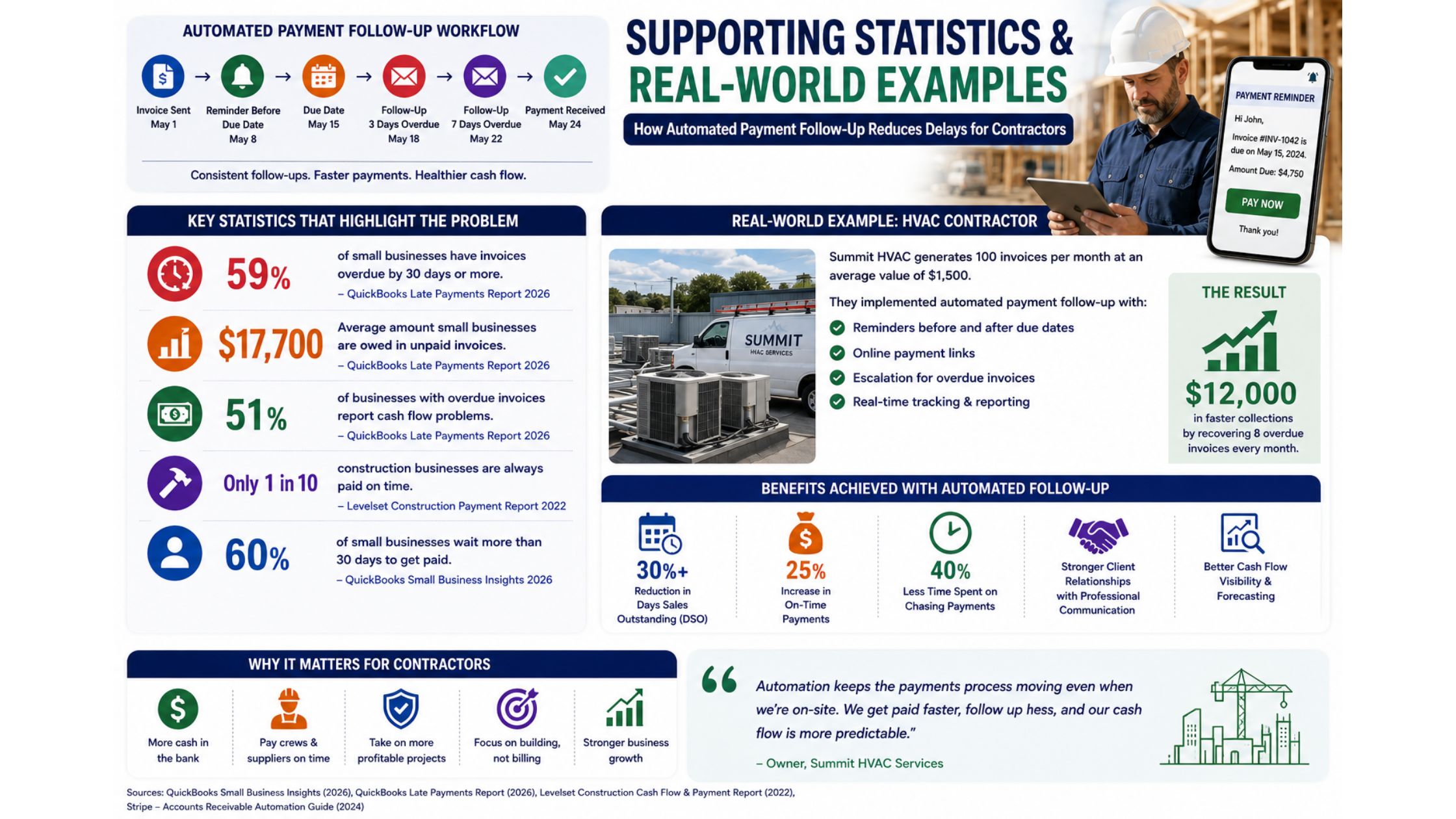
The business case for improving payment follow-up is substantial.
QuickBooks reported in 2026 that 59% of surveyed small businesses had invoices overdue by at least 30 days, while businesses waiting on unpaid invoices were owed an average of $17,700. It also found that 51% of businesses with overdue invoices reported cash-flow problems compared with 36% of businesses without them.
Construction-specific research from Levelset found that only around one in ten construction businesses reported always being paid on time. Slow payments were associated with wasted resources for 45% of respondents, reduced profits for 41%, and difficulty meeting payroll for 18%.
QuickBooks’ broader 2026 Small Business Insights research also found that 60% of respondents reported waiting more than 30 days for invoices to be paid.
A Practical Contractor Example
Consider an HVAC contractor generating 100 invoices per month at an average value of $1,500.
If 20 invoices become overdue, that means:
20 × $1,500 = $30,000 in outstanding receivables
The contractor implements a workflow that automatically:
- Sends reminders seven days before payment is due.
- Sends another notification on the due date.
- Follows up three and seven days after the deadline.
- Includes a direct online payment link.
- Flags invoices still unpaid after 14 days for personal follow-up.
If the process helps move even eight of those overdue invoices into the paid category sooner, the contractor accelerates:
8 × $1,500 = $12,000 in cash collection.
That example is illustrative, but it demonstrates the operational value. Automation does not need to eliminate every late payment to improve cash flow meaningfully.
Best Contractor Payments to Automate First
Contractors should prioritize predictable transactions where payment rules are already clearly defined.
Deposits
Send immediate confirmation and reminders when a project deposit has not been completed.
Progress Payments
Trigger invoices and reminders when agreed project milestones are reached.
Final Invoices
Begin follow-up immediately after project completion rather than allowing the account to age unnoticed.
Recurring Maintenance
Automate invoices and payment reminders for service agreements and maintenance contracts.
High-Value Overdue Accounts
Use AI or predefined rules to alert staff when large invoices cross specific aging thresholds.
Conclusion
So, how does automated payment follow-up reduce delays for contractors?
It replaces inconsistent manual chasing with a structured collection process that tracks every invoice from issue to payment.
Automated reminders keep deadlines visible. Digital payment links make invoices easier to settle. Escalation workflows ensure seriously overdue accounts receive attention. AI can identify higher-risk customers, while dashboards provide real-time visibility into outstanding cash.
The benefits include:
- Faster collections
- Fewer forgotten invoices
- More predictable cash flow
- Reduced administrative workload
- Better accounts receivable visibility
- More professional client communication
For contractors, the goal is not to send more aggressive payment reminders.
It is to create a payment process where the right follow-up happens automatically at the right time.
When every invoice is tracked, every overdue balance triggers an action, and customers have an easy way to pay, contractors can spend less time chasing money and more time completing profitable projects.