How can automated deposit reminders reduce cancellations for caterers when clients may request a date, approve a menu, or verbally confirm an event without actually paying the deposit that secures the booking?
For catering companies, an unconfirmed booking creates uncertainty.
A caterer may reserve staff, block a date, plan ingredients, decline another enquiry, or begin coordinating equipment for an event that has not been financially committed.
The longer a deposit remains unpaid, the greater that uncertainty becomes.
Manual follow-ups create another problem. Someone has to remember which invoices are outstanding, check payment statuses, email clients, send another message, and update the calendar when payment eventually arrives.
Automated deposit reminders can turn this inconsistent process into a structured booking workflow.
Modern catering payment platforms already support this approach. Square, for example, allows caterers to request upfront deposits, establish payment schedules, monitor unpaid invoices, and use automatic reminders to reduce overdue payments.
Reminder research also demonstrates that timely prompts can influence whether people follow through on scheduled commitments. A meta-analysis of 28 healthcare studies found SMS reminders significantly improved appointment attendance. While healthcare appointments are not catering bookings, the research supports the broader behavioural principle behind automated reminders: people sometimes need a well-timed prompt to complete an intended action.
For caterers, that action is paying the deposit that converts an enquiry into a confirmed event.
Direct Answer
Yes. Automated deposit reminders can help caterers reduce preventable cancellations and unconfirmed bookings by prompting clients to complete payment before important booking deadlines pass.
A simple workflow could look like:
Quote accepted → Deposit invoice sent → Reminder → Second reminder → Final deadline notice → Deposit paid → Booking confirmed
The automation monitors payment status continuously.
If the deposit arrives, reminders stop automatically.
If it remains unpaid, the next scheduled reminder is sent.
If the deadline passes, the booking can be flagged for staff review rather than remaining indefinitely on the calendar.
The objective is not to pressure clients. It is to make the commitment process clear.
Clients should know exactly how much they need to pay, when payment is due, what the deposit secures, whether it is refundable, what happens if the deadline passes, and how to complete payment.
That clarity benefits both sides.
Step-by-Step Breakdown
1. Define exactly when a catering booking becomes confirmed
Automation works best when the business has a clear booking policy.
A caterer might define a confirmed event as:
Proposal accepted + contract signed + deposit received
Until all required steps are complete, the event remains tentative.
This prevents staff from treating verbal interest as guaranteed revenue.
The policy should also specify the deposit amount or percentage, due date, remaining payment schedule, cancellation terms, and circumstances under which a date may be released.
The automation then enforces the workflow consistently rather than relying on employees to interpret each booking differently.
2. Send the deposit request immediately after approval
Speed matters once a client has decided to proceed.
If someone approves a $5,000 catering proposal on Monday but does not receive the deposit invoice until Thursday, unnecessary friction has been introduced.
Automation can trigger the invoice immediately after the appropriate booking milestone.
For example:
Proposal accepted at 2:15 PM
Deposit invoice generated at 2:16 PM
Payment link delivered at 2:16 PM
The client can complete the next step while the event is still top of mind.
Square’s catering tools support upfront deposits and flexible payment schedules, allowing catering businesses to structure payments around their booking requirements.
3. Build a reminder sequence around the deposit deadline
Sending one invoice and hoping the client remembers it is not a follow-up strategy.
A structured reminder sequence might be:
Immediately: Deposit invoice and payment link
3 days before deadline: Friendly reminder
1 day before deadline: Deposit due tomorrow
Due date: Deposit due today
After deadline: Booking status requires action
The exact timing should reflect how far in advance events are booked.
A wedding scheduled nine months away may justify a different sequence from corporate catering booked for next Friday.
Research from healthcare provides useful evidence on reminder frequency. A systematic review and meta-analysis found people receiving text notifications were 23% more likely to attend scheduled appointments than those receiving no notification and 25% less likely to no-show. Multiple notifications were more effective than a single notification.
These figures should not be treated as catering benchmarks, but they show why relying on one reminder may leave preventable follow-through problems unresolved.
4. Include the exact event information
Generic payment reminders create unnecessary confusion.
Instead of:
“Your payment is due.”
send a reminder containing the relevant booking information:
Event: Johnson Wedding Reception
Event date: October 24
Deposit: $1,500
Due: September 24
Status: Awaiting payment
Then provide a direct payment link.
Clients should not have to search old emails to understand what they are paying for.
This also creates an opportunity for personalization.
McKinsey found that 71% of consumers expect personalized interactions, while 76% become frustrated when those expectations are not met. It also found that 78% said personalized content made them more likely to repurchase.
For caterers, using actual event information makes automated communication feel relevant rather than generic.
5. Make paying the deposit simple
A reminder cannot fix a complicated payment process.
If the customer must call during business hours, download a PDF, locate bank details, manually enter information, and then email proof of payment, follow-through may suffer.
The reminder should ideally provide a clear route to an approved payment method.
The process could become:
Open reminder → Review amount → Pay securely → Receive confirmation
Square’s invoice tools, for example, support deposits and payment schedules so businesses can divide an invoice into an initial deposit and subsequent payments.
Removing unnecessary steps makes it easier for clients who already intend to book to complete the commitment.
6. Stop reminders immediately after payment
Few things make automation feel less intelligent than asking someone to pay an invoice they have already paid.
The payment system should update the CRM or booking platform immediately.
Once the deposit is received:
Deposit status: Paid
Reminder sequence: Stopped
Booking status: Confirmed
Confirmation message: Sent
Internal team: Updated
This avoids awkward communication and reduces manual reconciliation.
7. Automatically confirm the event after the deposit arrives
Payment should trigger the next stage of the customer experience.
The confirmation can include the event date, venue, deposit amount received, remaining balance, next payment date, current guest count, and next planning milestone.
This reassures the client that the date has been secured according to the caterer’s terms.
It also reduces unnecessary messages asking:
“Did you receive our deposit?”
The automation can answer that question immediately.
8. Escalate high-value unpaid bookings to staff
Not every unpaid deposit should receive endless automated reminders.
Some bookings deserve human intervention.
Suppose a $15,000 corporate event has an unpaid $3,000 deposit and the deadline is tomorrow.
Instead of simply sending another email, the system can create a task:
High-value booking at risk. Contact client today.
AI can further prioritize follow-ups based on event value, proximity of the event date, previous communication, payment history, and likelihood of conversion.
The goal is to use automation for routine follow-up while directing staff attention toward bookings where personal communication may matter most.
9. Release tentative dates according to clear policies
One hidden cost of unpaid deposits is blocked capacity.
Suppose two customers want catering for the same Saturday.
Customer A accepted the proposal but has not paid the required deposit.
Customer B is ready to confirm.
Without a clear system, staff may keep the date reserved indefinitely for Customer A and potentially lose Customer B as well.
Automated reminders can communicate a transparent deadline:
“Your deposit is due by Friday to confirm the booking. If payment is not received by the stated deadline, the date may be released according to our booking terms.”
Any release process should follow the caterer’s agreed contract and cancellation policies.
Automation simply ensures those rules are applied consistently.
10. Use reminders for final balances too
Deposit automation can extend beyond the initial booking.
Catering events often involve several financial milestones.
For example:
Booking: 25% deposit
30 days before event: Second payment
7 days before event: Final balance
The same reminder engine can monitor each stage.
This helps prevent caterers from approaching the event date with significant unpaid balances after ingredients, staff, rentals, and preparation have already been committed.
Square specifically supports invoice payment schedules that divide payments across multiple milestones.
11. Give clients an easy way to communicate changes
Not every unpaid deposit is forgotten.
Sometimes the client’s event date changed. Guest count changed. Budget changed. The event was cancelled. Internal approval is delayed.
A reminder should therefore provide an easy response option.
For example:
“Need to change your event details? Reply here or contact our team before completing payment.”
This can surface potential cancellations earlier.
A systematic review of appointment-reminder systems found that reminders can also encourage people to cancel or reschedule unwanted appointments earlier, allowing resources to be reallocated.
Again, this research comes from healthcare rather than catering. The useful principle is that an earlier cancellation can be operationally better than discovering at the last minute that a client never intended to proceed.
Supporting Statistics and Real-World Examples
Research on reminders provides useful evidence for the underlying behaviour.
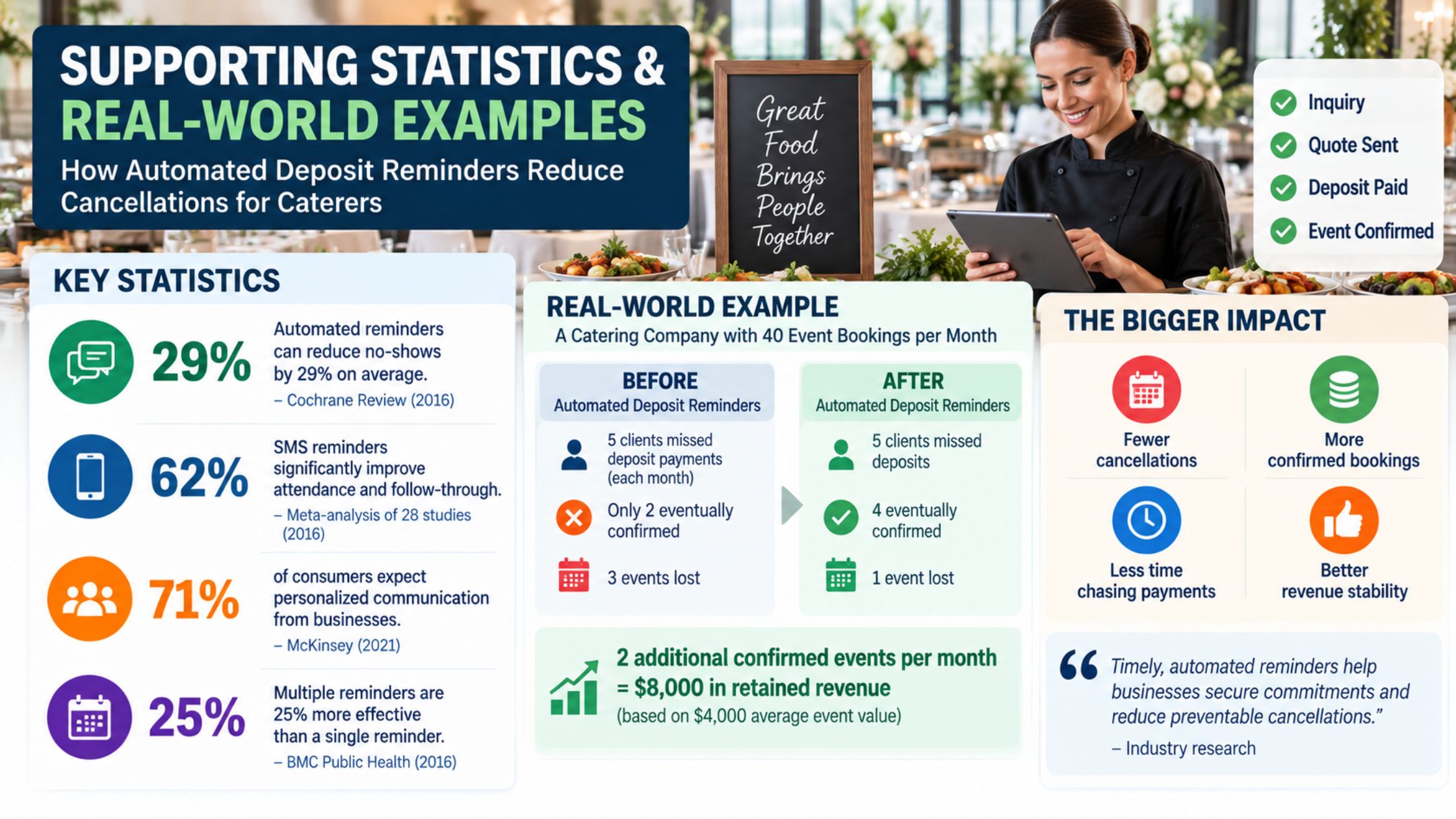
A meta-analysis covering 28 studies found SMS reminders improved attendance, with randomized controlled trials producing a pooled odds ratio of 1.62 for attendance compared with no reminder.
Another systematic review covering 29 studies found reminders reduced non-attendance, with automated reminders associated with an average 29% relative reduction from baseline non-attendance.
A separate meta-analysis involving more than 16,000 patients found text notifications increased attendance from 54% to 67% and reduced no-shows from 21% to 15%. Multiple notifications performed better than single notifications.
These studies measure healthcare attendance, not catering deposits, so their percentages should not be applied directly to catering businesses. They nevertheless provide credible evidence that automated reminders can influence follow-through on previously scheduled commitments.
Payment technology already applies the same principle commercially. Square promotes automatic invoice reminders specifically as a way for caterers to reduce overdue invoices, alongside upfront deposits and flexible payment schedules.
Practical Catering Example
Consider a catering company receiving 40 serious event bookings per month.
Each booking requires a deposit before the event becomes fully confirmed.
Suppose five clients per month fail to complete their deposit by the deadline.
Staff manually follow up, but only two eventually confirm.
That leaves three potential events unconfirmed.
Now the caterer introduces:
Immediate deposit invoices
Three automated reminders
Direct payment links
Automatic payment confirmation
Staff escalation for high-value bookings
Suppose the new process helps two additional clients complete their deposits each month.
If the average confirmed catering event is worth $4,000, that represents:
2 additional confirmed events × $4,000 = $8,000 in event revenue retained
Across 12 months:
$8,000 × 12 = $96,000 in annual event revenue associated with those additional confirmations
These figures are illustrative, not an industry benchmark. Actual results depend on average event value, existing deposit collection rates, lead volume, client intent, cancellation policies, seasonality, and reminder effectiveness.
The purpose of the example is to show why improving a small point in the booking process can have a meaningful financial impact when repeated across dozens of events.
Quick Tactical Setup for Caterers
Start by defining exactly when an event becomes confirmed and how long a tentative date can be held.
Connect your proposal, CRM, invoice, payment, and booking-calendar systems where practical.
Build a basic sequence covering invoice delivery, pre-deadline reminder, due-date reminder, overdue follow-up, payment confirmation, and staff escalation.
Personalize each message with the client’s event, date, amount due, deadline, and secure payment method.
Then track deposit payment rate, average days to deposit, overdue deposit rate, tentative booking cancellations, and revenue from confirmed events.
Do not judge the workflow only by how many reminders it sends.
Measure whether more qualified clients complete their deposits on time.
Conclusion
So, how can automated deposit reminders reduce cancellations for caterers?
They create a clear path between a client’s decision to book and the financial commitment that confirms the event.
Instead of relying on memory and manual follow-ups, caterers can automatically send invoices, remind clients before deadlines, provide convenient payment options, stop reminders after payment, escalate valuable bookings, and release dates according to established policies.
That can help catering businesses achieve:
- More deposits collected on time
- Fewer unconfirmed bookings
- Earlier visibility into cancellations
- Less manual payment chasing
- Better calendar accuracy
- More consistent booking processes
- Faster payment confirmation
- Stronger protection of valuable event dates
Automation cannot prevent every cancellation. A client may still change plans, lose a venue, reduce their budget, or decide not to proceed.
The more useful goal is to prevent avoidable uncertainty.
When clients receive the right reminder, with the right event information, before the right deadline, caterers have a better chance of turning genuine booking intent into a confirmed event.