Can automated client onboarding improve retention for accounting firms when new clients expect a smooth start, clear communication, secure document sharing, and timely answers from the moment they sign an engagement letter?
For accounting firms, winning a new client is only the beginning. The relationship must continue through document collection, bookkeeping setup, tax preparation, reporting, compliance deadlines, and ongoing financial advice.
Unfortunately, the onboarding process can create friction before the firm has demonstrated its value. Clients may receive repeated requests for the same documents, struggle to complete forms, wait for confirmation, or remain uncertain about what happens next. Meanwhile, accounting staff spend valuable time chasing information and coordinating tasks manually.
These early experiences influence how clients perceive the firm. A confusing onboarding process can make clients question whether the same disorganization will affect their accounts throughout the year.
The problem is measurable. A 2025 report from Suralink, based on research into accounting client experiences, found that 82% of surveyed clients were frustrated by vague or time-consuming requests, while 62% reported five or more communication breakdowns during an engagement. These findings highlight the importance of clear requests and coordinated communication.
Automated client onboarding helps accounting firms address these problems by standardizing welcome messages, engagement paperwork, document requests, task assignments, reminders, and progress updates.
The result is a more consistent first experience, less administrative friction, and a stronger foundation for long-term client relationships.
Direct Answer
Yes. Automated client onboarding can improve retention for accounting firms by helping clients get started faster, understand their responsibilities, submit documents on time, and receive consistent communication.
A typical automated onboarding workflow looks like this:
Engagement accepted → Welcome email → Digital forms → Secure document collection → Accounting system setup → Progress updates → First review meeting
Each stage has a clear trigger and completion condition. If a client submits the required documents, the system advances the workflow. If information remains missing, it sends a reminder or alerts the assigned employee.
Automation does not guarantee that clients will stay. They may leave because of pricing, poor advice, changing business needs, or dissatisfaction with the service itself. However, it can reduce avoidable frustration caused by delays, unclear instructions, and inconsistent follow-ups.
The objective is to make the first few weeks feel organized and reassuring while giving accountants more time to build meaningful client relationships.
Step-by-Step Breakdown
1. Send a personalized welcome immediately
The onboarding experience should begin as soon as the engagement is formally accepted.
Instead of waiting for an employee to prepare and send a welcome email, automation can trigger a personalized message containing the assigned accountant’s contact details, the agreed services, the next steps, and an estimated onboarding timeline.
For example, a bookkeeping client might receive a checklist covering accounting software access, bank feeds, previous financial statements, and business details. A tax client may receive a different checklist based on the services included in their engagement.
This helps clients understand what they have purchased and what the firm needs from them.
It also prevents the awkward gap between signing an engagement and hearing from the accounting team.
2. Collect engagement forms and essential information digitally
Manual paperwork creates unnecessary delays when clients must print forms, scan documents, and email attachments individually.
An automated workflow can send digital intake forms covering business structure, contact information, financial systems, reporting requirements, and relevant deadlines.
Once a client submits the form, the system can update the client record and notify the responsible team member.
Forms should request only information necessary for the engagement. Sensitive financial and identity documents should be collected through an appropriately secured portal rather than ordinary email attachments.
Digital forms also help standardize information collection across the firm, reducing the risk that one accountant requests essential details while another forgets them.
3. Create a tailored document checklist
One of the biggest onboarding bottlenecks is collecting documents from clients who are busy running their businesses.
A firm may need bank statements, payroll records, receipts, prior-year returns, invoices, or access to accounting software. Requesting everything in one generic email can overwhelm clients and make it difficult to understand priorities.
Automation can create a checklist based on the client’s service package.
For example:
- Bookkeeping: Bank statements, transaction records, and accounting software access.
- Tax preparation: Prior-year returns, income records, and relevant supporting documents.
- Payroll: Employee details, payroll history, and required tax information.
- Advisory: Financial statements, forecasts, business objectives, and key performance indicators.
The client can see what has been submitted, what remains outstanding, and which items are urgent.
This directly addresses the frustration around vague or time-consuming requests identified in Suralink’s client experience research.
4. Automate reminders for missing information
An onboarding checklist is only useful if outstanding tasks receive attention.
Suppose a new bookkeeping client has not uploaded the previous month’s bank statements. Without automation, an accountant may need to notice the missing file, draft a reminder, and remember to follow up again.
An automated sequence can send a friendly reminder after a defined period, followed by another reminder if the information remains outstanding.
If the deadline is approaching or the client repeatedly fails to respond, the workflow can notify the assigned accountant for personal follow-up.
The tone should remain helpful rather than demanding. Clients may be unsure which document is required or how to retrieve it.
A useful reminder explains the missing item, why it is needed, how to submit it securely, and whom to contact for assistance.
5. Assign internal tasks automatically
Client onboarding depends on coordinated work across multiple roles.
An accountant may need to review submitted information, a bookkeeper may need to configure the accounting system, and an administrator may need to confirm the engagement paperwork.
When these tasks are managed through email alone, responsibilities can become unclear.
Workflow automation can assign tasks according to service type, notify the responsible employee, establish deadlines, and escalate overdue actions.
For example, when all required bookkeeping documents arrive, the system can create a task for the bookkeeping team to review the records and configure the client’s account.
This prevents clients from waiting simply because an internal handoff was overlooked.
6. Keep clients informed about progress
Silence during onboarding can leave clients wondering whether the firm has received their documents or started working on their account.
Automated status updates can confirm important milestones, such as completed paperwork, document receipt, account setup, and readiness for the first review.
For example:
“Your onboarding documents have been received. Our team is reviewing the information and will contact you if anything else is needed.”
These updates reduce uncertainty without requiring an employee to write a separate email every time a task is completed.
Communication should remain relevant. Clients do not need notifications for every internal action, but they should hear about milestones that affect their responsibilities or expectations.
7. Use AI to identify missing or inconsistent information
Traditional automation follows predefined rules. AI can add another layer by helping classify documents, extract relevant information, summarize client responses, and identify possible gaps for review.
For example, an AI-assisted workflow might recognize that a client uploaded bank statements but did not provide the requested prior-year financial statements.
It could flag the missing item and prepare a draft reminder for an employee to approve.
AI should not independently make sensitive accounting judgments or assume that an unusual document is incorrect. Accountants should verify extracted information and retain control over financial decisions.
Data protection is essential. Firms should use approved tools, restrict access to confidential information, and understand how vendors store and process client data.
8. Schedule the first review meeting automatically
The first meeting helps establish expectations and gives clients an opportunity to ask questions.
Instead of exchanging multiple emails to find a suitable time, automation can send a scheduling link when the required onboarding steps are complete.
The meeting can cover reporting frequency, document submission procedures, deadlines, communication preferences, and the scope of the engagement.
For advisory clients, it can also establish business goals and identify areas where additional support may be useful.
A well-organized first meeting helps turn onboarding from a paperwork exercise into the beginning of a working relationship.
9. Check in after the first 30 days
Completing the onboarding checklist does not necessarily mean the client feels confident about the relationship.
An automated check-in after the first month can ask whether the client understands the process, knows whom to contact, and has experienced any difficulties.
Responses can be categorized for review. Positive feedback may indicate that the onboarding process is working, while complaints about unclear requests or slow communication should trigger follow-up from the responsible accountant.
This is also an opportunity to clarify service expectations before small frustrations become reasons to leave.
10. Measure onboarding quality and retention
Accounting firms should measure whether automation improves the client experience rather than simply counting emails sent.
Useful metrics include:
- Average time from signed engagement to onboarding completion
- Percentage of clients submitting documents on time
- Number of reminders required per client
- Time spent on manual follow-ups
- Client satisfaction after the first month
- Early-stage cancellations
- Client retention over 6 and 12 months
Compare results before and after implementation, accounting for differences in client types and service complexity.
If onboarding becomes faster but early cancellations remain unchanged, the firm may need to investigate pricing expectations, service quality, or the alignment between promised and delivered services.
Supporting Statistics and Real-World Examples
Research suggests that accounting firms have a practical reason to improve the early client experience.
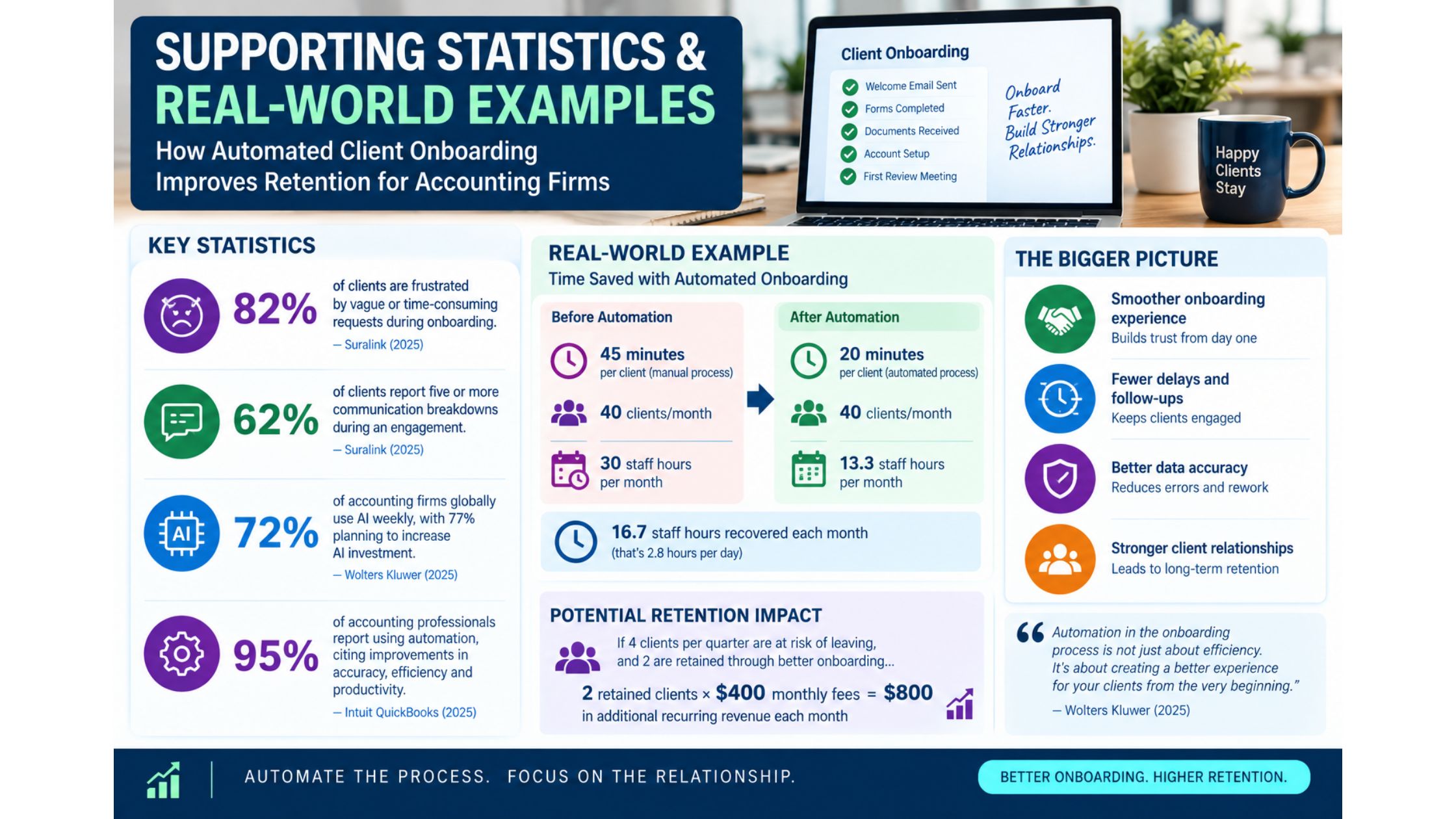
The 2025 Suralink study found that 82% of surveyed clients were frustrated by vague or time-consuming requests, and 62% reported five or more communication breakdowns during an engagement. The findings point to specific opportunities for automated checklists, clearer requests, and better communication workflows.
Technology adoption is also increasing across the profession. Wolters Kluwer’s 2025 Future Ready Accountant report found that 72% of firms globally used AI weekly, while 77% planned to increase AI investment. These figures cover accounting firms’ broader AI use, not onboarding alone, but they show that AI-assisted workflows are becoming more common.
Meanwhile, Intuit QuickBooks’ 2025 Accountant Technology Report found that 95% of surveyed accounting professionals reported using automation, with respondents identifying improvements in accuracy, workflow efficiency, productivity, and staff time savings. This supports the case for evaluating automation in repetitive administrative processes such as onboarding.
These findings do not prove that onboarding automation directly increases retention by a particular percentage. They show that communication friction is a real client-experience problem and that accounting firms are increasingly using technology to improve their workflows.
Practical Accounting Firm Example
Consider an accounting firm onboarding 40 new clients each month.
Before automation, staff manually send welcome emails, request documents, track incomplete forms, and follow up with clients. Suppose each client requires 45 minutes of administrative onboarding work.
40 clients × 45 minutes = 30 staff hours per month.
The firm introduces automated welcome messages, service-specific checklists, secure document requests, reminders, and task assignments.
Suppose the new workflow reduces manual onboarding work to 20 minutes per client.
40 clients × 20 minutes = 13.3 staff hours per month.
That represents approximately 16.7 staff hours recovered each month.
Now suppose the firm also identifies four clients per quarter who were at risk of disengaging because of confusing requests or poor follow-up, and personal intervention helps two remain active.
If each retained client generates $400 per month in fees, those two relationships represent $800 in monthly recurring fees, provided they remain clients.
These figures are illustrative, not industry benchmarks. Actual results depend on the firm’s client mix, workflow complexity, pricing, existing processes, and reasons for cancellation.
The lesson is that automation can improve operational efficiency while giving staff more time to resolve issues that require personal attention. Retention gains should be measured rather than assumed.
Quick Tactical Setup for Accounting Firms
Start with one service line, such as monthly bookkeeping, and map every step from signed engagement to completed account setup.
Create a personalized welcome email, a digital intake form, a secure document checklist, and reminders for missing information. Connect these steps to the firm’s CRM and workflow platform so task assignments and client statuses update consistently.
After the first month, review completion time, staff follow-up hours, client feedback, and early cancellations. Improve the workflow before extending it to tax preparation, payroll, or advisory services.
Use AI where it can assist with document classification, information extraction, or prioritizing follow-ups, while keeping confidential data secure and retaining human review.
Conclusion
Can automated client onboarding improve retention for accounting firms?
Yes. It can help firms reduce early friction, clarify responsibilities, collect documents more efficiently, coordinate internal tasks, and keep clients informed from the beginning of the relationship.
The most valuable improvements include:
- Faster, more consistent onboarding
- Clearer document requests
- Fewer missed follow-ups
- Better visibility into outstanding tasks
- More responsive client communication
- Less administrative work for accounting staff
- Earlier identification of dissatisfied clients
- A stronger foundation for long-term retention
Automation alone cannot compensate for poor accounting work or weak client relationships. Its value comes from making routine processes reliable, so staff can focus on accurate financial work, useful advice, and personal communication.
When clients know what to expect, can complete onboarding without unnecessary friction, and receive timely support, they have a stronger reason to continue working with the firm.